Capacity Review
The Capacity Review report shows every contact in your database alongside their contribution history — broken down by Primary and General election fund — as well as their Ask to Give, Ask to Raise, and prior cycle history. It is designed to help you understand how much each contributor has given, what their legal giving capacity is, and how their current-cycle giving compares to prior cycles. In states or campaigns where there is no legal contribution limit, it can also be used to view all contributions by fund type.
To access it, navigate to Reports in the left sidebar, then click Capacity Review under the Fundraising Reports tab.
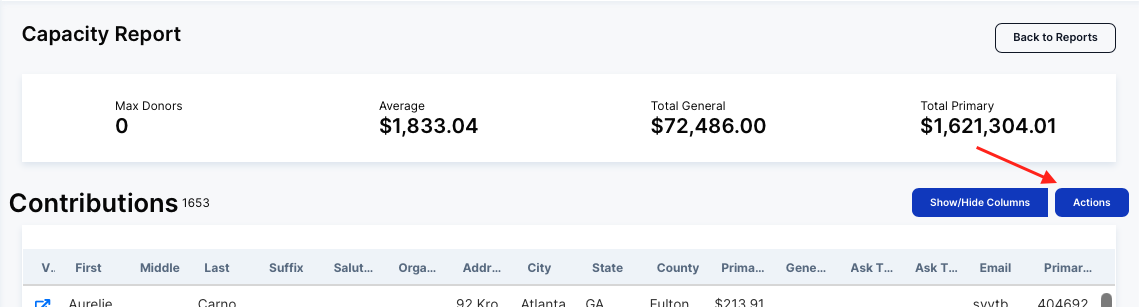
Summary Stats Bar
Four metrics appear at the top of the report:
Max Donors — The number of donors who have reached the maximum legal contribution limit. If your state or campaign has no limit, this will show 0.
Average — The average total contribution amount per person in the report.
Total General — The total amount raised for the General election fund across all contributors shown.
Total Primary — The total amount raised for the Primary election fund across all contributors shown.
The Contributions Table
The table lists every person in your database, with a record count shown next to "Contributions." Each row represents one person, not one contribution — this report is person-level, not transaction-level.
Show/Hide Columns
Click Show/Hide Columns to add or remove additional fields. Available columns include:
Person: First, Middle, Last, Suffix, Salutation, Email, Home Phone(s), Work Phone(s), Cell Phone(s), Unknown Phone(s)
Organizations: Organization Name
Address: Suffix, City, State, Postal Code, County
Contribution: Primary Limit, Primary Amount, General Limit, General Amount
Historical Cycles
Need this information in a spreadsheet? Click on "Actions" to export your data.