
How to Add and Use Organizations
What are Organizations?
Organizations in Campaign Deputy are entities — such as PACs, unions, trade associations, businesses, caucus committees, and other political groups — that can make contributions to or receive disbursements from your campaign. Unlike People (individual contacts), Organizations represent institutional or group-level actors that your campaign interacts with financially or strategically.
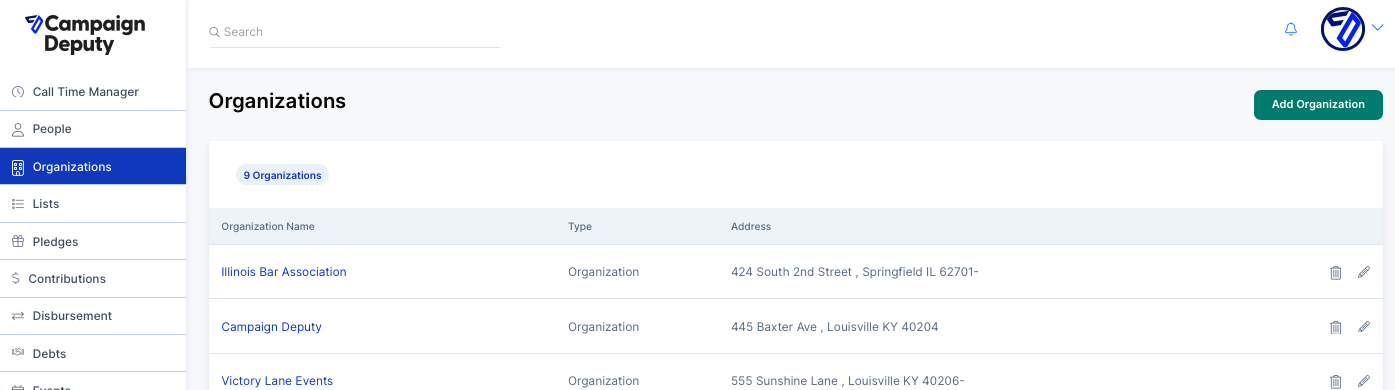
Each Organization has its own profile that includes its type, address, PAC registration IDs, and fundraising targets, along with a complete history of contributions, disbursements, and pledges associated with it.
What are Organizations used for?
Organizations serve as the central hub for tracking your campaign's financial and strategic relationships with outside groups. Here's what you can do with them:
• Track contributions received. When a PAC, union, or other organization donates to your campaign, that contribution can be logged directly against the Organization's profile. This gives you a real-time view of lifetime giving, broken down by election type (Primary, General, etc.).
• Track disbursements. Payments made to organizations — such as vendor payments or transfers to affiliated committees — are recorded under the Organization's Disbursements tab.
• Manage pledges. Open pledges from an organization are tracked and visible at a glance on their profile, so you always know what's been committed but not yet received.
• Maintain PAC and compliance data. Each organization can store its State ID and Federal ID (e.g., FEC Committee ID), making it easy to reference registration numbers for compliance and reporting purposes.
• Set fundraising goals. You can record an "Ask To Give" and "Ask To Raise" amount for each organization, useful for tracking solicitation targets.
• Categorize by type. Organizations can be classified into types such as Contributing Organization, PAC, Federal PAC, Affiliate, Caucus Campaign Committee, Executive Committee, and more, helping you segment and report on your organizational relationships.
How do you add an Organization?
You can add organizations to Campaign Deputy either manually one at a time, or in bulk via import.
Adding an organization manually
1. Navigate to Organizations in the left-hand sidebar.
2. Click the Add Organization button in the top right corner of the Organizations list.
3. Fill in the organization's details:
Organization Name (required) — The full name of the organization.
Type — Select the appropriate organization type from the dropdown (e.g., Contributing Organization, PAC, Federal PAC, Affiliate, etc.).
Description — An optional description or notes about the organization.
PAC IDs — Enter the State ID and/or Federal ID if the organization is a registered PAC.
Fundraising — Optionally set an "Ask To Give" and "Ask To Raise" dollar amount.
Address — Enter the organization's street address, city, state, zip code, and country.
4. Click Add to save the organization.
Importing organizations in bulk
If you have a list of organizations in a spreadsheet, you can import them all at once using the Campaign Deputy import tool. During the import process, you'll be taken to an Import Mapping screen where you map the columns in your file to the correct fields in Campaign Deputy. Organization-specific fields you can map to include Organization Name, Compliance Specific ID, address fields, contribution data, disbursement data, and more at the same time.
Note: Campaign Deputy recommends mapping at least two identifying fields (such as organization name and address) to ensure records can be properly de-duplicated during import.
Once added — whether manually or via import — each organization will appear in your Organizations list and its profile will be ready to receive contributions, disbursements, pledges, and notes.