
Duplicate Report
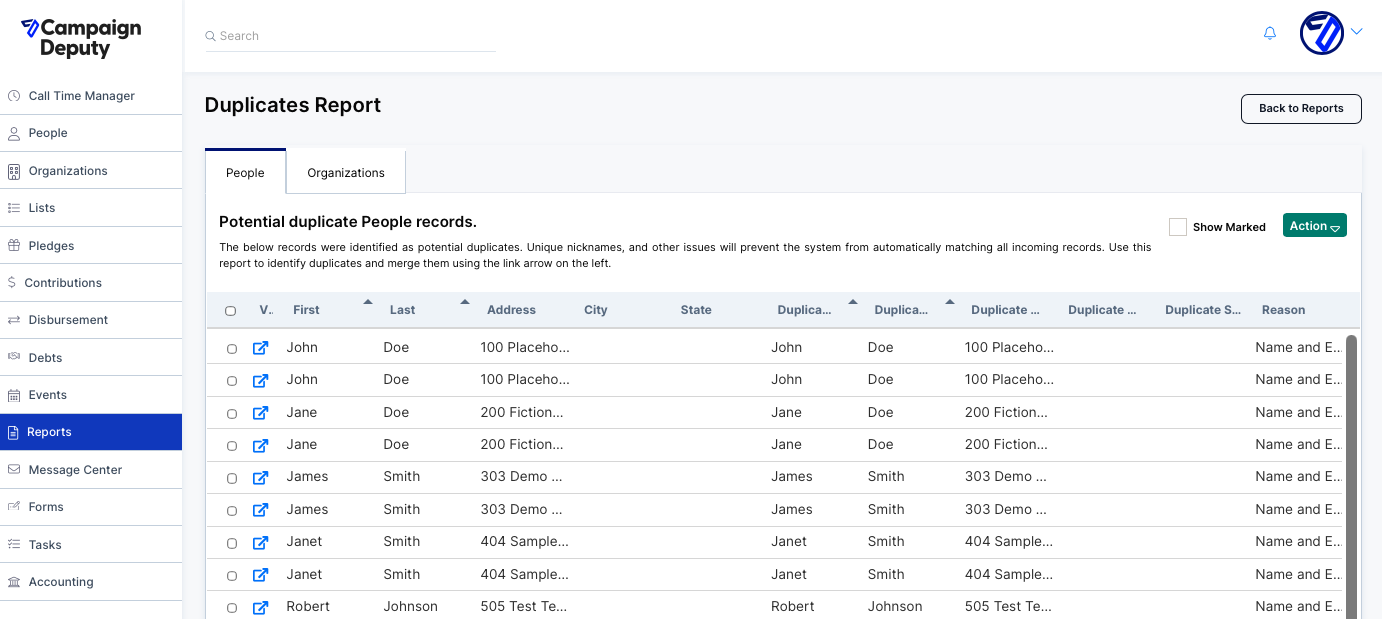
The Duplicates Report scans your database and flags records that look like they might be the same person or organization entered more than once. It's split into two tabs, People and Organizations, so you can review each record type separately. Each row shows the original record next to the record it's been matched with, so you can compare them side by side before deciding what to do.
Navigate to the Reports section, then "Data Management" to access your Duplicates Report.
How Duplicates Are Identified
For every flagged pair, the report lists a Reason explaining why the two records were matched. On this page, every visible match is labeled "Name and Email Match," meaning the system found records with the same name and email address and flagged them as likely duplicates.
This matching isn't exhaustive: unique nicknames and other inconsistencies between records can prevent the system from automatically catching every duplicate. So while this report is a useful starting point for cleanup, it shouldn't be treated as a complete list of every duplicate in your account — some may still need to be found manually.
Using the Report
Once you've reviewed a pair and confirmed it's genuinely a duplicate, you can merge the two records using the link icon on the left of that row. If a pair isn't actually a duplicate, you can select it and mark it accordingly using the Action menu instead, so it stops showing up as a flagged match.
How do Duplicates get created?
Duplicate profiles can occur for many reasons, but the root cause always comes down to the data associated with each profile. Campaign Deputy checks across multiple data points in profiles, so the more data you can have that matches across both profiles (think phone numbers, address, email address, etc), the higher likelihood that a duplicate won't get created.
For example, if Susan Smith is listed on an import that only contains First and Last Names, along with a phone number, and then donates through ActBlue, the likelihood for a duplicate profile getting created is very high, since the original profile only had two datapoints to check against.
Duplicates can also get created if the same contact is listed on a file to be imported more than once. To avoid duplicates in this situation, it is best to consolidate the data into one row if possible. If that is not possible (Call Time Data or Contributions), you will need to use to PersonID to ensure duplicates are not created.