Call Time Report
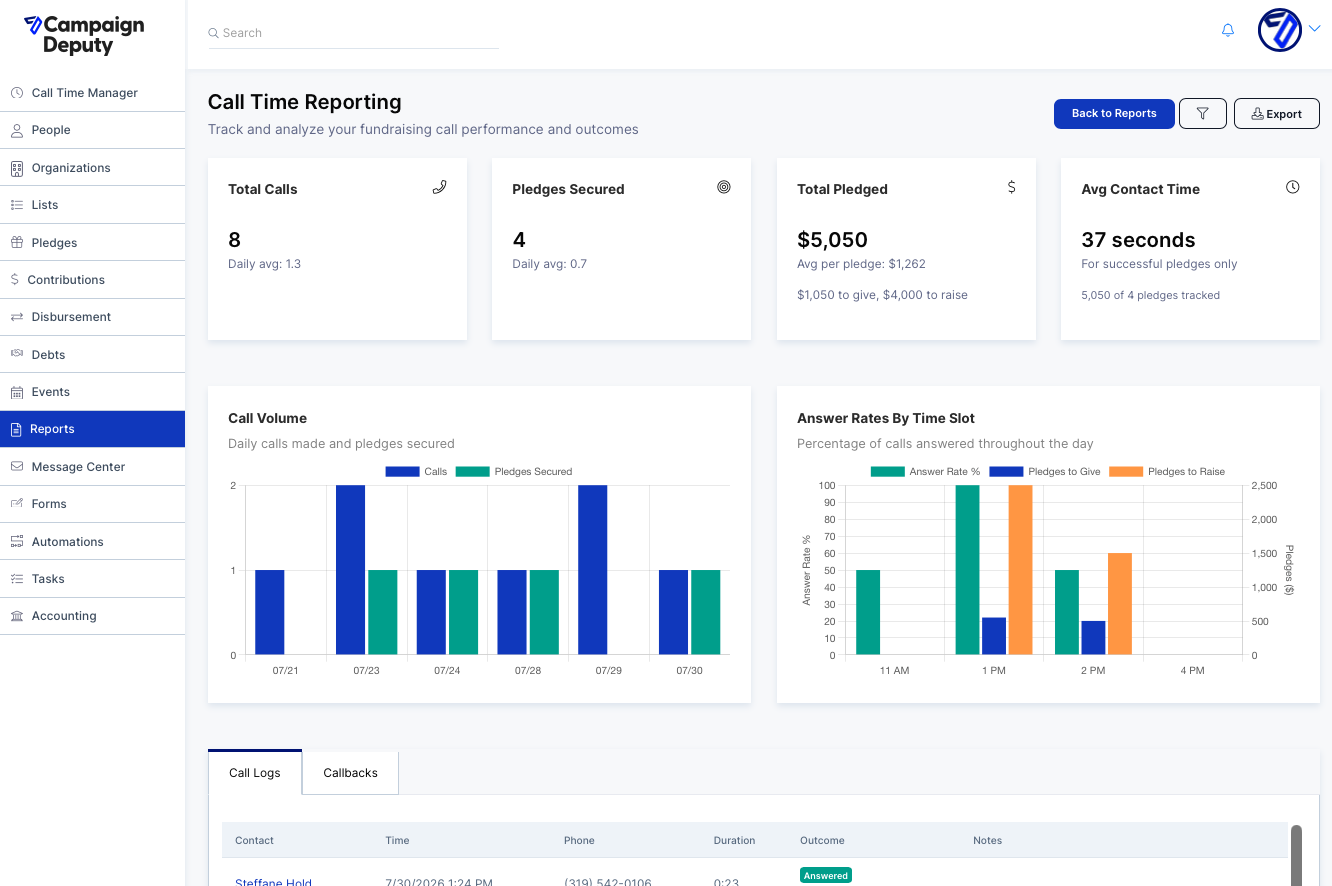
The Call Time Reporting page helps you track and analyze the performance of your fundraising call time sessions. It brings together call volume, pledge outcomes, contact time, and individual call records in one place so you can see how your calling efforts are translating into fundraising results.
You can find this report by selecting Reports from the left-hand navigation menu, then choosing Call Time Reporting.
Filtering Your Data
Click the filter icon next to the Export button to open the filter panel. From here you can narrow the report to a specific time period or subset of calls using the following options.
The From and To date fields let you set the date range for the report. The List dropdown lets you limit results to calls made against a specific calling list, or leave it set to "All Lists" to see everything. The Call Result dropdown lets you select one or more outcomes to include, such as No Answer, Call Back, Left Message, Wrong Number, Answered, Incoming Call Answered, or Call Back Reminder. Once you've made your selections, click Apply to refresh the report.
Summary Metrics
At the top of the report, four summary cards give you a quick snapshot of performance for the selected date range.
Total Calls shows the number of calls placed, along with a daily average. Pledges Secured shows how many calls resulted in a pledge, also with a daily average. Total Pledged shows the combined dollar value of all pledges, broken down into amounts pledged "to give" versus "to raise," along with the average pledge size. Avg Contact Time shows the average length of calls that resulted in a successful pledge, which can help you gauge how much conversation time tends to lead to a commitment.
Charts
Below the summary cards, two charts visualize your calling activity in more depth.
The Call Volume chart shows calls made and pledges secured broken out by day, making it easy to spot your most productive calling days. The Answer Rates by Time Slot chart shows what percentage of calls were answered during different times of day, alongside the dollar amounts pledged during those windows. This can help you identify the best times of day to schedule calling sessions.
Call Logs and Callbacks
Further down the page, two tabs give you record-level detail.
The Call Logs tab lists every individual call in the selected date range, including the contact's name, the date and time of the call, phone number, call duration, outcome, and any notes entered by the caller (including pledge details when applicable). The Callbacks tab lists contacts who have a callback scheduled, showing the callback date, contact name, when they were originally called, any pledge amount recorded, and related notes.
Need this information in a spreadsheet? Click "Export" to download your data.