
Candidate Contributions
Each account comes with a candidate record when the account is set up that determines if a transaction will show on Line 11d. This is a special record that shows as candidate when viewing that profile on that particular record and cannot be deleted.
FEC Electronic Filing
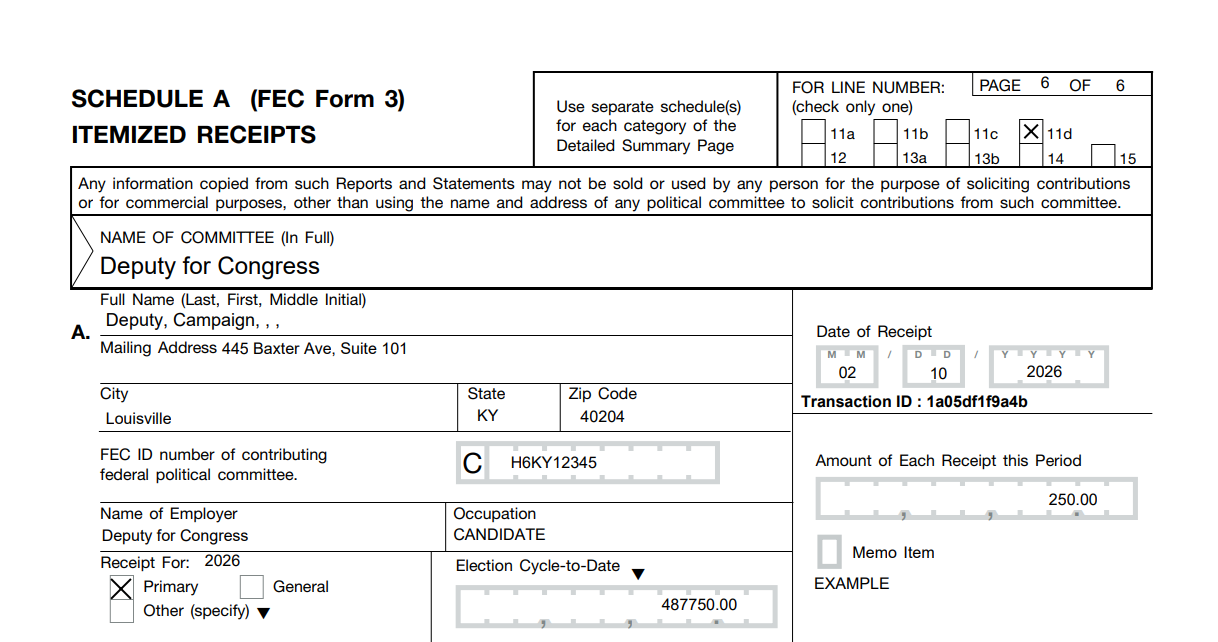
When this special Candidate record has any contributions or disbursements, the FEC electronic reporting requirements require us to label it as a candidate with the code CAN. We're also required to include the candidate's candidate ID, which starts with H, S, or P for the candidate. This may show up as the committee number on the printed PDF.
Without the FEC Candidate's ID, the FEC will throw a warning
"Form{Item}: SA11D {CANDIDATE}
Field Name: #028 Donor Candidate FEC ID Number
Conditionally Required field is Empty"
We understand that this may look incorrect in the FEC Printed PDF. We have verified this is the intended behavior with reports filed with other systems, the electronic file format guide, and FECFile.
Merging Candidate Records
If you have existing transactions, you can merge into this special record. This preserves the record and moves the contributions and disbursements into this particular record so that they are properly reported on your FEC report and show on line 11D.